We highly encourage you to review our Community Guidelines first before reading this article!
TABLE OF CONTENTS
At Medal, our goal is to deliver the best possible content-sharing and clipping experience, powered by our passionate community and supported by a safe, welcoming environment. We encourage everyone to connect with friends, meet new people, and showcase their epic gaming moments on the platform.
To ensure a positive experience for all users, our Community Guidelines apply across all areas of Medal—including all text and imagery shared on our platform, as well as on our official Discord server.
We strongly recommend reviewing the Community Guidelines before proceeding with this page to better understand how our ban and appeal policies are enforced.
Ban/Appeals On Medal
If you see or believe that a Medal user is breaking our Community Guidelines while browsing Medal, report it to us! Do not try to take charge of the situation yourself.
To report a clip, click on the three dots of the clip and select Report. Fill out the form as needed.
To report a profile, comment or chat message, send us a ticket using the following template:
- Subject Title: Rule Violation Report - [Offending Medal Username]
- Medal User URL: [Offending Medal User URL]
- Date of Rule Violation: [Date Offense Occurred]
- Reason For Report: [Rule Violation] - (Please be as detailed as possible)
- Evidence: (Include any screenshots or clip links here or as attachments)
We encourage you to report all concerns, even if you are not sure if the content or activity is a violation.
Managing Content Violations & Appeals
Medal now allows users to manage certain content and comment safety violations directly from the desktop application.
Where to Find It
Head over to: Settings > My Account > Account Violations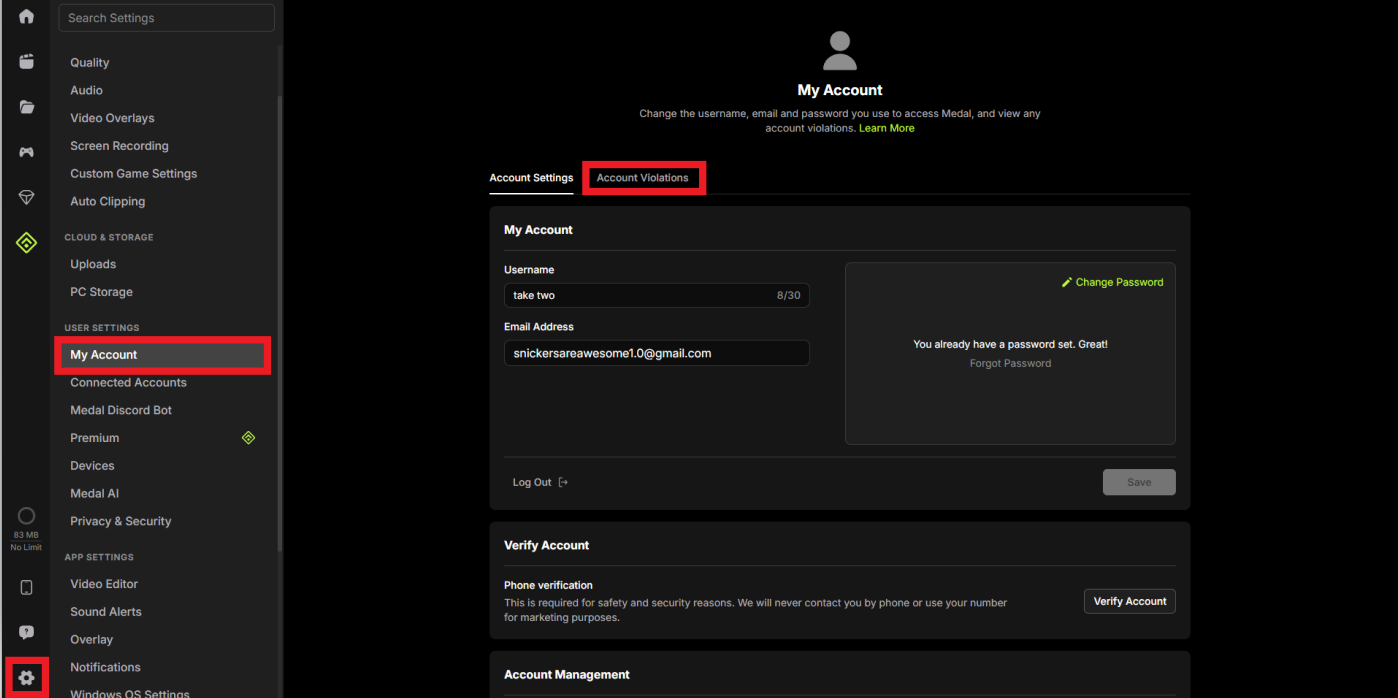
Here, you can view active violations associated with your account, including flagged content/comments and their moderation actions.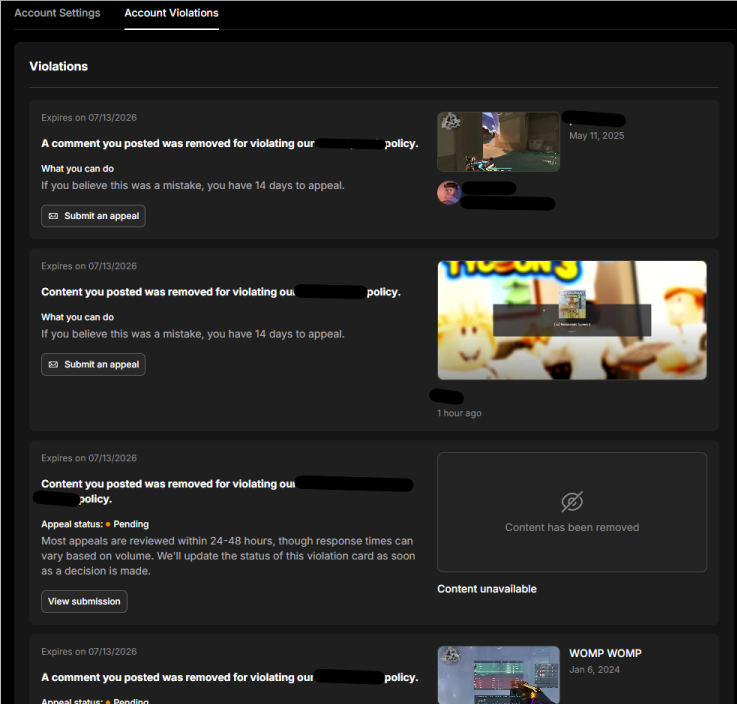
What You Can Do
From the Account Violations page, you can:
View details about content or comments that violated our policies.
Check the current status of moderation actions and appeals.
Submit an appeal directly through the desktop client when eligible.
Track whether an appeal is pending, approved, or denied.
Appeal Review Times
Most appeals are reviewed within 24–48 hours, although response times may vary depending on review volume. The status shown within the application will automatically update once a decision has been made.
Important Notes
Not all violations are eligible for appeal.
Decisions made by the Trust & Safety team may be final depending on the severity and nature of the violation.
Repeated violations may result in additional restrictions on your account.
This feature is intended to provide greater transparency around moderation actions and reduce the need to contact support for routine appeal requests.
If you believe certain content violates our rules or would like specific content removed, we recommend reporting it directly through the Medal app or website. For more urgent matters, you can also contact us by emailing appeals@medal.tv.
Ban/Appeal On Medal's Official Discord Server
Please note that bans and appeals on Medal’s official Discord server are handled separately from those on the Medal app or website.
If you believe a Discord community member is violating our rules—as outlined in the #rules channel—please report the issue to one of our Discord Moderators. Our moderation team will conduct a thorough investigation and take appropriate action based on our community guidelines.
In most cases, banned users will receive a Direct Message on Discord explaining the reason for the ban, along with a link to our official appeal form. In more serious cases, bans may be issued without the option to appeal—this will also be communicated via Direct Message when applicable.
If you’ve been banned from the Medal Discord server and wish to appeal, you can do so by completing the Appeal Form. Be sure to include all required details, along with a clear explanation of why you believe the ban should be reconsidered. Appeals are reviewed daily by our Discord moderation team.
Was this article helpful?
That’s Great!
Thank you for your feedback
Sorry! We couldn't be helpful
Thank you for your feedback
Feedback sent
We appreciate your effort and will try to fix the article